
As a tech enthusiast and iPhone user for over a decade, I've seen these devices evolve and become an integral part of our lives. From my first iPhone 4 to my current iPhone 17, there's always been a sense of excitement in discovering new capabilities and tricks to get the most out of this technology. If you've ever wondered how you can improve your iPhone's performance, this article is for you. Here are 11 practical tips to enhance your everyday iPhone experience.
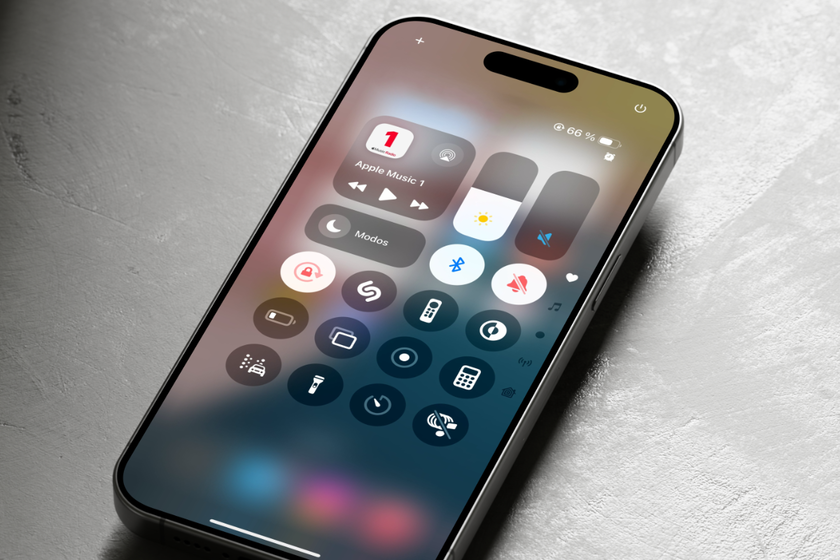
1. Customize your Control Center
The Control Center is one of those resources whose capabilities often go unnoticed. Customizing it will allow you to quickly access the functions you actually use on a daily basis.
- How to do it: Go to Settings > Control Center and select the features you want to add.
- Benefit: Instant access to the tools you actually use, without having to navigate through multiple menus.
I remember the days with the iPhone 6 when this feature didn't exist, what a difference it makes to have it now!
2. Improve Your Battery Performance

Nothing is more frustrating than being in the middle of a call or watching a video and having your battery die quickly. I've learned several techniques that help extend battery life.
- Activate Power Saving Mode: By going to Settings > Battery, you can activate this feature to save energy when the battery level is low.
- Turn off Background Refresh: This can be done in Settings > General > Background Refresh.
From the old iPhone 5S to the modern iPhone 14 Plus + Screen Protector (Pre-owned) , applying these changes has considerably extended the lifespan between charges.
3. Manage your notifications

Being constantly distracted by app notifications can be exhausting. Here's how to reduce those interruptions.
- Configure Notification Management: Go to Settings > Notifications and select the apps you actually want to receive alerts from.
- Benefit: A clearer focus during the day, fewer distractions.
Now, on my iPhone 17 , this has been one of the most efficient improvements I've implemented.
4. Learn to Use Siri Effectively
Getting the most out of Siri can change the way you interact with your iPhone. Siri is a powerful assistant when used correctly.
- Activate and Customize Siri: Go to Settings > Siri & Search. You can choose when and how to activate it.
- Tangible Benefits: Use voice commands to send messages, set reminders, or perform quick searches.
When I was experimenting with the iPhone X, it was more of a curiosity than anything useful, but its progress has been remarkable since then. Now I find it hard to imagine using my phone without Siri.
5. Organize Your Applications Efficiently
A recurring theme in forums and talks is how many feel their screens are disorganized and overwhelmed with applications.
- Use App Libraries and Folders: Sort your apps into folders and use the App Library to keep them organized.
- Practical Benefit: A clean desk makes it easier to find what you need quickly.
As Apple introduced the App Library feature with iOS 14 (on my now veteran iPhone 12), managing my apps has never been easier.
6. Use Shortcuts to Automate Tasks
This feature has been one of my favorites and has evolved considerably since the early days of the iPhone 8 Plus.
- Create Custom Shortcuts: Go to the Shortcuts app, where you can create custom automations for tasks you perform frequently.
- Example: Create a shortcut to send your location to a loved one when leaving work.
These shortcuts have simplified my day-to-day life tremendously, and it's something I highly recommend.
7. Make the Most of Your Camera

The iPhone camera has always been one of its best features, and it gets better with each new model. Anyone who loves photography will understand the importance of using their camera effectively.
- Night Mode and Portrait Mode: Experiment with these modes to capture near-professional quality images.
- Tip: Explore the photo editing features included in the Photos app.
The change from my iPhone 13 Mini was significant in terms of camera capabilities, making every shot spectacular.
8. Protect your privacy
Privacy is crucial when it comes to our personal data and apps. Apple has made significant improvements in this area.
- Configure App Privacy: Go to Settings > Privacy and check your app permissions.
- Benefit: Greater control over what data is shared and with whom.
As someone who has used iPhones since the 7, these privacy options have given me immeasurable peace of mind.
9. Regularly update your iOS

While this may seem like basic advice, keeping your operating system up to date is essential for your phone to function properly.
- Direct Benefit: Improves security, introduces new features, and optimizes device performance.
My iPhone 16e has experienced great performance improvements after its iOS updates.
10. Use AirDrop for Fast Transfers

Sending large files by any other means can be tedious. This is where AirDrop proves invaluable.
- How to do it: Just make sure both devices have AirDrop enabled and turn on Bluetooth.
- Practical Benefit: Fast transfers of files, photos, or contacts between Apple devices.
From the iPhone 11 to our latest iPhone 17 Pro Max , this has been a way to save time.
11. Turn off features you don't need
Regardless of the model, there will always be features you don't need. Identifying and disabling them can improve your iPhone's performance.
- Wi-Fi Assistant and Automatic Download: Turn off in Settings > Cellular and iTunes and App Store respectively.
- Benefit: Optimizes data usage and improves device efficiency.
My experiences with the iPhone XS taught me that these settings can make a noticeable difference in performance.
Ultimately, getting the most out of your iPhone isn't just about having the latest model. Taking advantage of hidden features, keeping the system optimized, and finding ways to personalize your experience transforms your everyday life. Do you have any other tips or tricks you'd like to share? Leave them in the comments!
Visit our homepage at GSM Pro to learn more about our products.
For more iPhone options, visit the full collection here .